Enterprise Translation
September 09, 2026
|
2 min read
Ship Content That Looks Right the First Time: Introducing In-Context Preview
In-Context Preview, now available from LILT, is a visual preview that shows translated content in its original layout. Translators and reviewers catch text expansion, overflow, and layout breaks in real time and fix them before the file ships.

LILT Team
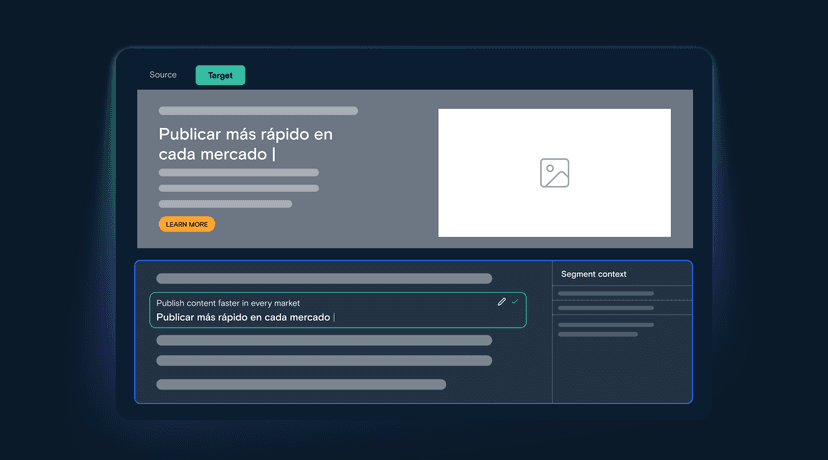
A translation can be perfectly accurate and still be wrong on the page. A headline that fits neatly in English wraps onto three lines in German. A button label overflows its container. A caption sits next to the wrong image. A table cell pushes a column off the slide. None of it shows up in a two-column editor, and all of it shows up in the final file.
We are excited to announce that In-Context Preview is now available in exclusive open preview to LILT customers. In-Context Preview is a visual preview of translated content in its original layout that lets human translators and expert reviewers spot and fix issues in real time, in context, before the file ever ships.
The hidden cost of translating out of context
Most translation work still happens in a user interface with source and target segments but no picture of where any of it lands. Layout lives somewhere else entirely, in a source PDF open in another tab, in a deck someone has to download, in a formatting pass that happens days later.
That gap is where global content programs quietly lose time and money. Text expansion and overflow aren't caught until desktop publishing. Meaning that depended on a nearby image, heading, or table header gets translated in isolation and comes back subtly off. Every miss triggers another round trip between reviewers, production, and the requesting team, the kind of extra review cycle that delays a launch by a week and turns a routine campaign into an escalation.
Multiply that across markets, file types, and content owners, and layout rework becomes one of the largest sources of avoidable delay in an otherwise automated multilingual workflow, a manual bottleneck sitting at the end of a pipeline built for speed.
One pane, full context
In-Context Preview closes that gap by putting the rendered document right next to the work.
- Ease of use. A single pane view eliminates tedious cross-file referencing and downloads. Reviewers see the translation and the layout together, in the same place they're already working.
- Accelerate projects. Text expansion and overflow, layout breaks, spacing, and truncation are visible instantly, and fixable on the spot, instead of in an extra review cycle after delivery.
- Validate for context. Translators can confirm that meaning fits the surrounding visual context: the image it sits beside, the heading it falls under, the control it labels.

In-Context Preview supports all common file types enterprise teams actually work in: PDF, Microsoft Word, PowerPoint, Excel, HTML, plain text (TXT), Markdown (MD), and CSV, across every language LILT supports. It is the same layout fidelity behind everything from technical documentation to marketing decks.
Available today
In-Context Preview is live in Exclusive Open Preview for LILT customers, with no setup required. See where content lands, spend less time fixing files, and more time shipping into new markets.
Want to learn more? Let's chat.
Share this post


Find some time with LILT
Enterprise-grade content seamlessly translated with AI to help your business scale globally.
Book a MeetingShare this post